Jump to a section
- Title tagsthe headline Google shows for each page
- Meta descriptionsthey earn clicks, not rankings
- Naming your services and locationwithout keyword stuffing
- Website, Business Profile, and Search Consolewhat each one actually controls
- What Google weighs for local rankingrelevance, distance, and prominence
- Google Maps and Apple Mapstwo separate systems
- Common mistakesquick things to check on your own site
- The checklistwork through it, then come back and score yourself
1
Title Tags
Every page on a website carries an invisible headline called a title tag. It lives in the code and in the browser tab, and it is the bold blue text Google shows in search results.
It is one of the clearest signals available for telling both Google and a potential client what the page is about and where the business is located.
HTML, goes in the <head> of the page<title>Classic Lash Extensions | Lush Lash Studio, South Austin</title><title>Lash Extensions Austin TX Best Lash Studio Near Me Austin Lashes Austin</title>A recipe that works across most service pages
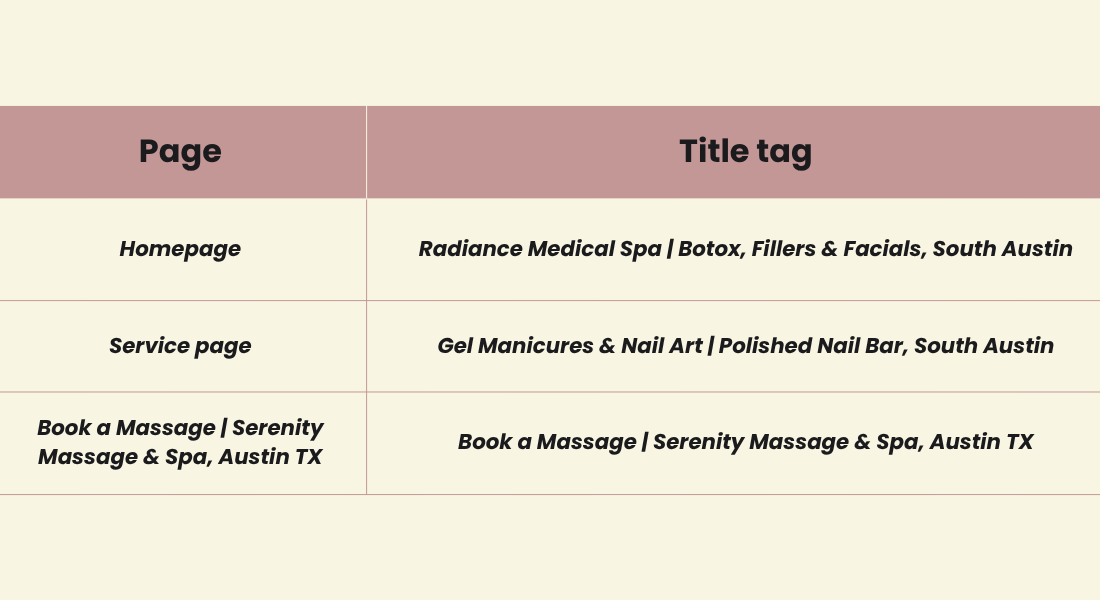
Note: Google does not publish a fixed character limit, but long titles are truncated to fit the display, especially on mobile. Keep the title concise enough to show up in full rather than chasing a specific count.
2
Meta Descriptions
The meta description does not affect ranking. Google builds the search snippet primarily from page content, and only uses the meta description when it describes the page more clearly than the surrounding text does.
What it does control is the gray text under the blue title link, the part that persuades someone to click one result over another in the same position. A well written description improves click-through rate; it does not change where the page ranks.
HTML, also in the <head><meta name="description" content="Book a Botox consultation or HydraFacial
at Radiance Medical Spa in South Austin. Now accepting new patients,
online booking available.">What makes a good one
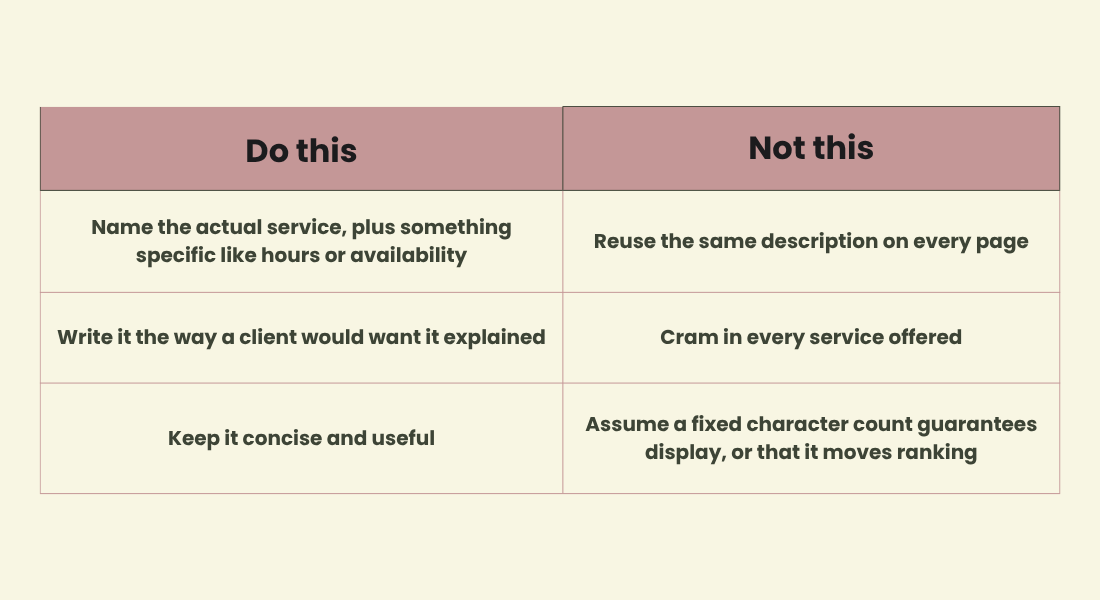
Example: two businesses rank in the same two positions for "medical spa austin." The one with a specific, clearly written description earns more of the clicks, even at the identical position.
3
Naming Services and Location Without Keyword Stuffing
Repeating a phrase like "nail salon austin" throughout a site feels like it should help, but Google's systems are built to read natural language, not repeated phrases, and repetition is treated as a spam signal rather than a relevance signal.
The service and location generally belong in a handful of specific places:
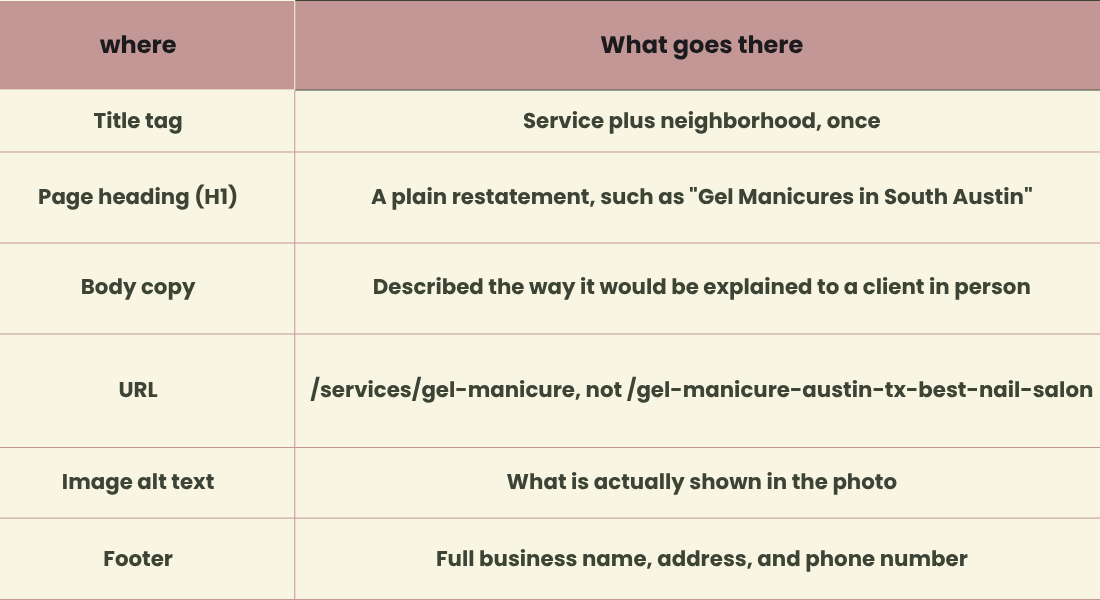
Example: "We specialize in gel manicures for South Austin clients who want long-lasting color without the wait" communicates the same information as "Gel Manicure Austin gel manicures near me best nail salon Austin," and does so in a way that reads naturally to both a person and to Google.
4
Website, Google Business Profile, and Search Console
These three are often grouped together as "Google SEO," but each one does a distinct job.
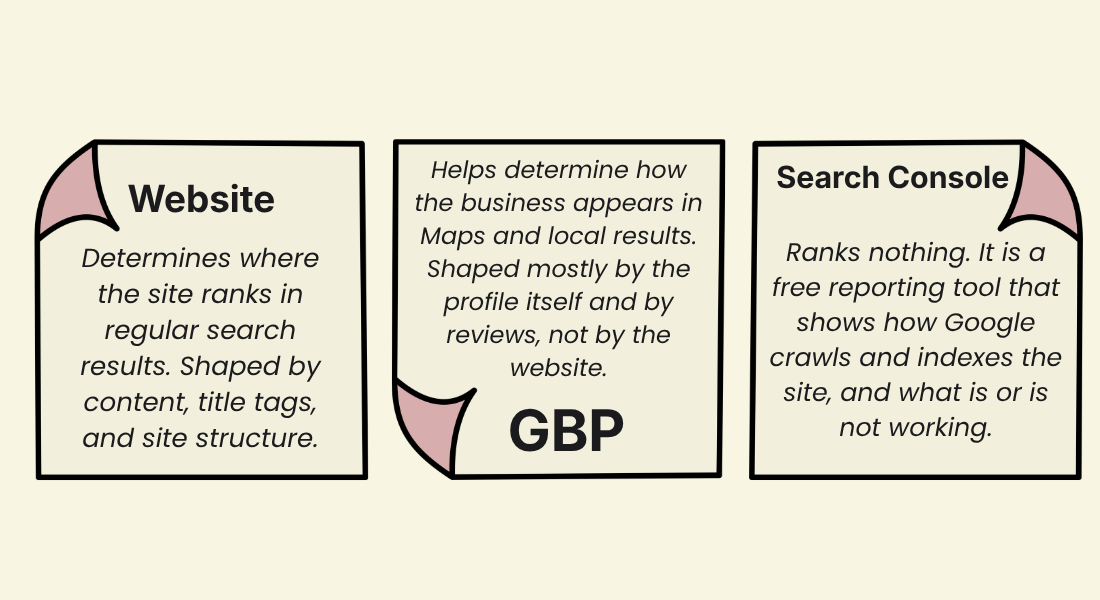
The thread connecting all three is consistency. The business name, address, and phone number should match, exactly, across the website, the Business Profile, and any other listing.
5
What Google Weighs for Local Ranking
Per Google's Business Profile Help Center, local results come down to three factors.
Relevance
How well the profile matches the search. Improved by providing complete, detailed business information, not by repeating keywords.
Distance
How close the business is to the person searching. Largely outside anyone's control; keeping the address accurate is the main lever available.
Prominence
How well known the business is. Reviews, ratings, links from other sites, and general online presence all contribute. Google has also said that a business's position in regular web results plays a part, so standard SEO practices still matter here.
Worth noting: a well written title tag helps a website show up more clearly in regular search. It is not a direct lever for moving a Business Profile higher in Maps. That comes mostly from the profile itself, reviews, and consistent information across listings. The website supports that, it does not replace it.
Structured data
The code snippet below is called schema markup or structured data. It spells business details out for Google in a format the system can read directly. Google states that structured data helps it understand a page and can make it eligible for certain search features. It is not a confirmed ranking lever for Maps, but it removes ambiguity about basic facts like address and hours.
HTML, place near the bottom of the homepage<script type="application/ld+json">
{
// Matches the details on the Google Business Profile
"@context": "https://schema.org",
"@type": "BeautySalon",
"name": "Lush Lash Studio",
"url": "https://lushlashstudio.com",
"telephone": "+1 512 555 0134",
"address": {
"@type": "PostalAddress",
"streetAddress": "123 Main St, Suite 4",
"addressLocality": "Austin",
"addressRegion": "TX",
"postalCode": "78704",
"addressCountry": "US"
},
"priceRange": "$$"
}
</script>Paste this near the bottom of the homepage code, before </body>, with the business's real details, using the most specific schema.org type that applies (NailSalon, DaySpa, HairSalon, and BeautySalon are all valid options depending on the business).
Generating it without writing it by hand: TechnicalSEO.com's Schema Markup Generator produces this code from a simple form.
Checking it once it is live: paste the page's URL into Google's Rich Results Test, which fetches the page directly and flags anything missing. Then use the URL Inspection tool inside Search Console to confirm Google can access and read that same page.
6
Google Maps and Apple Maps Are Separate Systems
Everything above describes how Google ranks a business. Apple Maps runs on a separate listing with its own rules. Claiming one does nothing for the other.
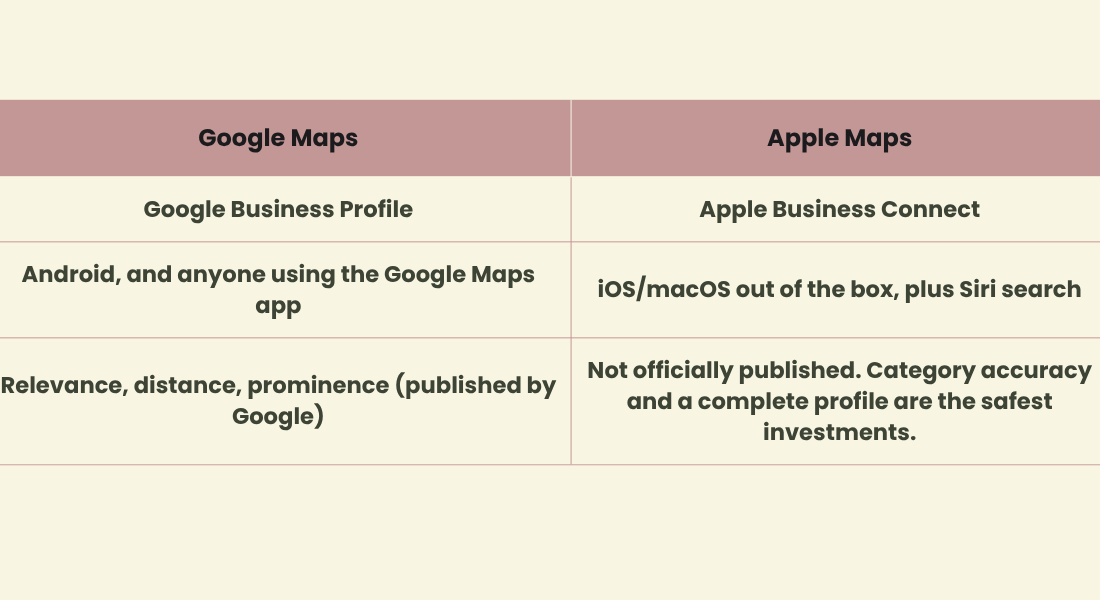
Quick step: claim the free listing at businessconnect.apple.com and match it to the Google information exactly.
7
Common Mistakes
- Chasing the wrong fixExpecting a meta description rewrite to solve a Maps ranking problem.
- Inconsistent listingsA medical spa lists "Suite 4" on its website, no suite number on Google, and an outdated phone number on Yelp.
- Keyword stuffed titlesA massage studio repeats the city name five times in one title tag.
- Search Console left unopenedA broken booking page for a nail salon can sit unnoticed for months.
- Missing or mismatched schemaStructured data that does not match what is actually on the page.
- Thin location pagesA lash studio creates a page for every nearby town with barely any real content on each one.
- Unanswered reviewsGood or bad, an unanswered review is a missed signal, and it reads as inattentive to prospective clients.
8
The Checklist
At this point the article has covered what to look at and what to fix. The next step is to go through the site, the Business Profile, and Search Console and make the changes that apply.
Once that work is done, come back to this page and work through the checklist below. Checking off each item confirms it is actually in place, rather than assumed, and the score at the end gives a quick read on how complete the setup is.
Website
Tap a box to check it off. Tap the text to see what it means.
- A unique title tag on every page (service plus neighborhood, once)The title tag is the headline Google shows in search results. Give each page its own, naming the service and area once, instead of reusing one title across the site.
- A unique, clearly written meta description per pageThis is the short pitch under the title link. Write a specific sentence for each page describing what it offers, rather than a copied line.
- Structured data using the most specific type that applies, with details matching the real business informationThis is the JSON-LD code block from earlier in the guide. Paste it near the bottom of the homepage with the real name, address, and phone filled in.
- Name, address, and phone in the footer, identical to GoogleCopy the details exactly as they appear on the Google Business Profile, including punctuation, into the site's footer.
- Real, distinct content on every service pageEach service page should read as written for that specific service, not a template with a single word swapped out.
- Fast loading, mobile friendly pagesMost clients check a business out on a phone first. Open the site on a phone and confirm it loads quickly and displays correctly.
Google Business Profile
- Profile claimed and verifiedSearch the business on Google, claim the listing if it is not already claimed, and complete Google's verification steps.
- Categories, hours, services, and description filled out completelyFill in every field Google offers rather than the bare minimum. A more complete profile is more likely to match relevant searches.
- Website field pointing to the right pageConfirm the link on the profile opens the actual site, ideally the most relevant page, and not a dead link or an old domain.
- Photos kept currentRefresh photos of the space, the work, and the team periodically instead of leaving the same set from years earlier.
- Every review answeredReply to reviews, positive and negative, in a genuine voice. It signals to Google and to future clients that someone is paying attention.
Search Console
- Property verified, sitemap submittedAdd the site to Search Console, verify ownership, and submit a sitemap so Google knows every page that exists.
- Page indexing report checked for errorsThis report shows which pages Google was unable to index, and why, so broken pages do not go unnoticed.
- Search performance checked monthlyThis shows the exact phrases people typed before landing on the site, useful for identifying what is working and what is missing.
0/10Setup Score
Check off items above as they are confirmed in place. The score updates as items are completed.
Summary
None of this is about tricking Google. It is about providing clear, matching, complete information about a real business doing real work, so Google can confidently direct people to it. Most businesses are only missing a handful of these items, and addressing them does not require a redesign.